
As a home automation enthusiast, the 1 thing that I always wanted to automate is keeping track of bus arrivals. Wouldn’t it be great to glance at a dashboard or receive notifications to know exactly when the bus is arriving? That’s why I built SG Bus Arrivals , a custom integration for Home Assistant .
Today, I will be sharing my journey of building SG Bus Arrivals.
Early Beginnings
When I first moved to my new house in 2023, bus services were few and far in between. Missing a bus would mean waiting for at least 20-30 minutes for the next bus. There were already transport apps such as MyTransport.SG , but I wanted to have a more seamless experience than launching an app and navigating through menus.
Hence, I set out to develop an automation to send notification for bus arrivals when I’m about to leave my home. Thankfully, LTA provides access to a wealth of public transport data, including real-time bus arrivals via the LTA DataMall Public Transport API .
My first implementation was a No Code solution based on YAML-configuration. The configuration defines the REST API call that would fetch me the bus arrival times.
Home Assistant configuration.yaml:
rest_command:
  get_bus_arrivals:
    url: 'https://datamall2.mytransport.sg/ltaodataservice/v3/BusArrival?ServiceNo={{serviceNo}}&BusStopCode={{busStopCode}}'
    method: GET
    headers:
        accept: application/json
        AccountKey: !secret account_key
While it did work, it was clunky and had no error handling or flow control. Moreover, my automations were cluttered with service invocations and parsing of HTTP responses.
The Goal: Bus Arrival Sensors
The next evolution was to build an integration which exposes bus arrival information as sensors in Home Assistant. This enables easy monitoring using dashboards and simplified automations.
Building the Integration Piece-by-Piece
Note: Some Home Assistant specific terminologies are used henceforth
Here’s a quick overview of functionalities that I built for the integration:
Integration Logo
I used Gen AI to generate the base logo. Next, I did a little touch-up using GIMP to remove noise and change color palettes to match the colors used by buses and bus stops in Singapore.
The final step is to create a pull request (PR) to submit my logos to the Home Assistant Brands GitHub repository. It takes a long time to get approval, so I continued with the development of my integration while waiting for my PR to be merged.
Here’s the logo:
LTA DataMall Client
I built a REST API consumer client for invoking the LTA DataMall APIs based on the LTA DataMall API User Guide .
(If you don’t have an account key, you will need to request for API access . The account key is required to authenticate with the API.)
The relevant APIs implemented were the bus arrival information, bus routes and bus stop details.
UI-based Configuration
I created a config flow to allow the user to configure authentication for the LTA DataMall API. I also created a subentry flow for creating the sensors based on the bus stop and bus service number.
Data Update Coordinator
The data update coordinator is a component of the integration responsible for using the LTA DataMall client to poll for bus arrival details and providing the data to the sensors.
Sensors
Sensors are entities which display the bus arrival details such as estimated arrival times, bus type (Single Deck / Double Deck), etc.
I also used dynamic icons which changes based on the sensor state. For example, if the bus is wheelchair accessible, the sensor will have a wheelchair icon.
I then linked the sensors to their respective subentry so that they can be easily managed as a group.
Services
I exposed a service which requests the coordinator to refresh sensor data. Usually, this isn’t required since the coordinator will fetch the data at regular intervals. For folks who don’t like interval polling, this is an alternative which provides full control of when the update happens.
Translations
Singapore is a multilingual society, and it would benefit the integration to have all the main languages (English, Chinese, Malay, Tamil) supported. Besides, it doesn’t take a lot of effort since Home Assistant already has a translation framework.
I only included English translations since I am focusing on the core functionalities of the integration.
Integration Showcase
Here are some of the screenshots from the integration and how I have used it.
Dashboard
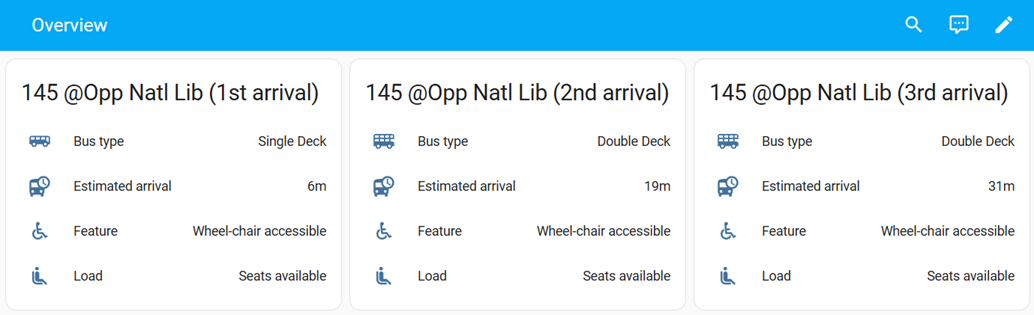
I plan to mount a cheap tablet near the main door of my house so that I can glance at the bus arrivals. Do I have time for a coffee or should I be running for the bus stop? This magic crystal ball will have the answers.
Sample dashboard:
Automation
Send / update push notification of bus arrivals when I leave home or when I am at a specific bus stop. No more fiddling with apps!
Conclusion
Building SG Bus Arrivals has been an enjoyable and rewarding experience. It’s a practical addition to my smart home, and I hope others will find it useful too!
You can find more details about the project in my GitHub repository: https://github.com/hanwg/sg-bus-arrivals